Tuesday, May 26, 2015

Difference between Organization, Internal Division, Account and Partner in Siebel

What is the difference between Organization, Internal Division, Account and Partner in Siebel?
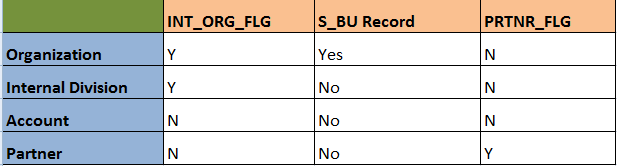
Organization:

An organization (in Siebel terminology) is a business unit within an company, enterprise or organization. Organizations represents the broadest divisions of the company. An organization controls the data access of the employees that are assigned to it. Organizations can be internal, or they can be external (in the case of Siebel PRM).

In Siebel technical terms, an organization is that which satisfies the below 2 conditions:

1. S_ORG_EXT.INT_ORG_FLG = 'Y'
2. Has an associated S_BU record.

E.g. Default Organization

select int_org_flg from siebel.s_org_ext where name = 'Default Organization';
select * from siebel.s_bu where name = 'Default Organization';


Internal Division:

Divisions are used to create organization structure and to link positions to that organization structure. Divisions belong to organizations and have no direct effect on visibility

In technical terms, an internal division satisfies below 2 conditions:

1. S_ORG_EXT.INT_ORG_FLG = 'Y'
2. Does not have associated S_BU record.

E.g. INTERNAL

select int_org_flg from siebel.s_org_ext where name = 'INTERNAL';


Account:

An account is any external organization with which your company does business. It negotiates agreements, receives service and bills, and raises trouble tickets. An account is usually the central entity of a Siebel CRM implementation. It may also represent a current or potential client, a business partner, or a competitor.

An Account satisfies the below conditions:

1. S_ORG_EXT.INT_ORG_FLG = 'N'
2. Obviously it does not have associated S_BU record.

E.g. ABC Corp

select int_org_flg from siebel.s_org_ext where name = 'ABC Corp';


Partner:

A partner organization is generally a channel or alliance partners, distributors, resellers, agents, brokers, or dealers of the brand owner company.

A Partner satisfies 2 conditions:

1. S_ORG_EXT.INT_ORG_FLG = 'N' and S_ORG_EXT.PRTNR_FLG = 'Y
2. No associated S_BU record.

E.g. Helix Services

select int_org_flg, prtnr_flg from siebel.s_org_ext where name = 'Helix Services';


To summarize:


Mohammed Arif

Monday, May 18, 2015

Error SBL-EIM-00306, in "ifb_name.ifb" line 63: Invalid token for right-hand side.

Error SBL-EIM-00306, in "ifb_name.ifb" line 63: Invalid token for right-hand side.

This error is one of the rare-coming errors for experienced professional but common for beginners as the cause is so tuned that is difficult to identify.


Well, with the error description itself it is clear that something is wrong/incorrect in the configuration file. Lets discuss the problem, cause and solution for this.


Problem:

Error encountered on UI when the EIM is run "SBL-EIM-00204: Invalid configuration file (ifb) name". This is a very generic error which may not give you a hint about the actual error. So when you dig the log you may find "Error SBL-EIM-00306, in "ifb_name.ifb" line 63: Invalid token for right-hand side."

Cause: 

The actual cause of this error might be more than one or may be altogether different at different times. The one that i found out (in my case) was a space after the DEFAULT COLUMN parameter. Below was the cause:

DEFAULT COLUMN = ADMIN_ADJ_FLG, "N"   <-- space after statement ends


Solution:

So the simple solution here is to double check for any space after any statement in the ifb, particularly the Default column parameter. The space after this parameter is treated as a token which is not recognized by the EIM engine which reads the configuration file before starting the actual load. The right hand side means that the cause is after "=" sign which is treated as right hand side whereas Default Column is treated as left hand side.


Keep reading...

Mohammed Arif

Tuesday, December 16, 2014

SBL-EIM-00206: Failed to run initial process.


Problem:

EIM job failing and the error thrown on UI is "SBL-EIM-00206: Failed to run initial process.". What could be the reason?

Solution:

This is one of the most common error that you can see on the "Completion Information" column on Admin- Server mgmt job list applet. Also this error is faced mostly by beginners in siebel EIM.

First thing, don't panic at all..its a common, known and small issue. Go back and look at your configuration file. If you dont find anything wrong, look again into it.

Most probably it results due to typo in the ifb file. For e.g. the IFB has

INSERT ROW = S_CONTACT, TRUE instead of INSERT ROWS = S_CONTACT, TRUE
[Siebel Intrface Manager] instead of [Siebel Interface Manager]
LOG TRANSACTIONS = FALSE instead of LOG TRANSACTION = FALSE

...and what not!! Look alphabet by alphabet. Sometimes you may miss a parameter which is mandatory like TABLE, BATCH, TYPE etc.

If everyting is ok in IFB, dig the log, you will surely find the root cause here :-)


Delete contacts from siebel through EIM


How to delete contacts from siebel through EIM?

Deleting from siebel can be done by 3 different ways depending on the requirement:

1. Deleting from a target/non-target base table using the user keys: DELETE EXACT method
2. Deleting from a target base table using a filter condition: DELETE MATCHES method
3. Deleting all rows from target base table: DELETE ALL ROWS method

Identify the deletion method:

Here we will take example of deleting contacts by using DELETE EXACT method. The requirement is to delete duplicate contacts in siebel. Once the logic for identifying duplicate contacts is implemented (this may depend on specific business scenario), we can go ahead and delete the party records associated with the contacts.

Get all information needed to load in EIM table:

Remember: To delete a contact, you need to delete contact records and associations from atleast 4 tables: S_PARTY, S_CONTACT, S_CONTACT_BU AND S_POSTN_CON. This is same as when importing a contact. There may be other assoicated records that you may want to delete like activities, service requests, opportunities etc. For accomplishsing these you need to identify all the child tables and records where reference to these contacts are present, build the logic and delete the data.

The only thing need to be identified after implemeting duplicate logic is the PARTY_UID of S_PARTY table. This can be obtained by below query:

--Execute:
SELECT
  CON.ROW_ID,
  PAR.PARTY_UID,
  PAR.PARTY_TYPE_CD
FROM
  SIEBEL.S_CONTACT CON,
  SIEBEL.S_PARTY PAR
WHERE
  PAR.ROW_ID = CON.PAR_ROW_ID
  AND CON.ROW_ID IN(/*DUPLICATE LOGIC SUBQUERY RETURNING CONTACT ROW_ID*/);

Load EIM table:

The interesting thing is that for deleting a contact, only party details need to be entered in EIM_CONTACT. The party information (PARTY_UID, PARTY_TYPE_CD) are the only requirement to delete a contact from all the 4 base tables mentioned above.

--Script:
INSERT INTO SIEBEL.EIM_CONTACT
(
  ROW_ID,
  IF_ROW_STAT,
  IF_ROW_BATCH_NUM,
  PARTY_UID,
  PARTY_TYPE_CD
)
SELECT
  ROWNUM,
  'FOR_IMPORT',
  1,
  PAR.PARTY_UID,
  PAR.PARTY_TYPE_CD
FROM
  SIEBEL.S_CONTACT CON,
  SIEBEL.S_PARTY PAR
WHERE
  PAR.ROW_ID = CON.PAR_ROW_ID
  AND CON.ROW_ID IN(/*DUPLICATE LOGIC SUBQUERY RETURNING CONTACT ROW_ID*/);

Create IFB and Run EIM job:

[Siebel Interface Manager]

PROCESS = "DELETE_CONTACTS"

[DELETE_CONTACTS]
    TYPE = SHELL
    INCLUDE = DELETE_CONTACTS_RECORDS

[DELETE_CONTACTS_RECORDS]
    TYPE = DELETE
    BATCH = 1
    TABLE = EIM_CONTACT
    ONLY BASE TABLES = S_PARTY
    DELETE EXACT = TRUE

    COMMIT EACH PASS = FALSE
    COMMIT EACH TABLE = FALSE
    ROLLBACK ON ERROR = TRUE

Verify the status of the records:

select count(1), if_row_stat, if_row_batch_num
from siebel.eim_contact
where if_row_batch_num = 1
group by if_row_stat, if_row_batch_num;

Thursday, December 11, 2014

Oracle PL/SQL performance problems: SQL Tuning

The first basic step towards PL/SQL block/procedure/package tuning:
In most of the EIM processing, the data in EIM tables are pushed through PL/SQL packages or standalone procedures etc. At times the pl/sql code becomes bottleneck during the cut-over window/deployment espicially when the amount of data is huge. Proper tuning of the pl/sql code in advance can reduce the execution time and increase the throughput.

Here I would like focus on just one little but very important and critical parameter for performance. Normally when the throughput is poor and the performance is at stake, we try to put the blame on database factors [and yes the DBA too :-)], available physical resources and many others. But the question is to realize what utilizes the database resources and how efficiently it utilizes.

The basic element of every pl/sql code is the embedded SQL statements. The first thing that should come to our mind when concerned with performance tuning is the SQL statements inside the pl/sql code. Slow SQL statements are the main reason for slow execution. Tuning these sql statement can greatly enhance the performance of the overall code.

You can find a lot amount of content on tuning SQL statement and that too in great details on the internet, here i will just summarize those tips for reference and relate it with Siebel EIM if applicable:

1. Make sure you have appropriate indexes on the  staging and other external ables that are used to push data to EIM tables. This may depend on your requirements.

2. Make sure you have up-to-date statistics on all the tables, using the subprograms in the DBMS_STATS package. For EIM processing this is very very beneficial. (for both EIM and Base tables) E.g. 
-- Execute:
EXEC DBMS_STATS.GATHER_TABLE_STATS('SIEBEL','EIM_CONTACT',DEGREE  =>10,ESTIMATE_PERCENT =>100,METHOD_OPT =>'FOR ALL INDEXED COLUMNS SIZE AUTO',GRANULARITY =>'ALL',CASCADE=>TRUE);
3. Analyze the execution plans and performance of the SQL statements, using: EXPLAIN PLAN statement. E.g.
 
-- Execute:
explain plan for
select * from STG_PRODUCT where batch = '125642890235; -- your SQL statement

-- Output the explain plan
select PLAN_TABLE_OUTPUT
from table(dbms_xplan.display('plan_table',null,'basic'));


4. Rewrite the SQL statements if necessary. For example, query hints can avoid problems such as unnecessary full-table scans. Avoid unnecessary full table scans for tables, this is very costly in terms of execution time.

5. Combine multiple SQL statements into one if possible. Each time you run a SQL statement in PL/SQL (and vice versa) there is a context switch and SQL statements have to be sent to the SQL statement executor (SQL engine) in the database. Obviously, therefore, if you have fewer SQL statements embedded in your PL/SQL code you will reduce the load on the Oracle database processing those statements.

6. a) If you are running SQL statements inside a PL/SQL loop, look at the FORALL statement as a way to replace loops of INSERT, UPDATE, and DELETE statements.
b) If you are looping through the result set of a query, look at the BULK COLLECT clause of the SELECT INTO statement as a way to bring the entire result set into memory in a single operation.
Both these are PL/SQL features but helps in tuning the sql statements.

7. Inefficient usage of loops inside the code can also prove very costly. Loops can be replaced with FORALL statements.

8. Use the BULK COLLECT clause on the query to bring the query results into memory in one operation

9. Use subselect (nesting one query inside another) for filtering query results.

10. Use highly optimized string functions such as REPLACE, TRANSLATE, SUBSTR, INSTR, RPAD, and LTRIM, these are very efficient as these use low-level code.

11. use regular expressions like REGEXP_LIKE, REGEXP_INSTR, REGEXP_REPLACE, and REGEXP_SUBSTR for searching and manipulating strings.

12. Implement short-circuit evaluation (as it is called) i.e. put the least expensive conditions first in the WHERE clause that evaluates multiple conditions separated by AND or OR.

13. Choose data types carefully to minimize implicit conversions as too many implicit conversions becomes overhead during execution. Like use of PLS_INTEGER instead of INTEGER etc.

14. Finally, do not ignore the warnings thrown by the compiler, applying the advice of the compiler might increase the efficiency of the overall code.

Much more and much detail can be added to it, but I have kept it simple and precise. You can pick each one of these and explore and research more on oracle documentation.

Have a great tuning :-)