Thursday, February 9, 2017
Tuesday, January 17, 2017
S1000 (1652): [tp][ODBC Oracle driver][Oracle]ORA-01652: unable to extend temp segment by 128 in tablespace USERS
This time i would like to address a common error in an uncommon situation. The exact reason for this issue is not known to me, probably somebody in the comments could let me know.
PROBLEM:
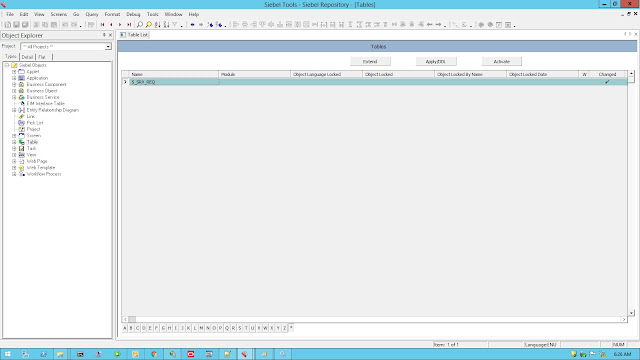
If you have extended a Siebel table in Siebel tools or created a new column or altered any other table child attributes, you would like to perform Apply/DDL and then would expect the change to be on database.
Well in doing so, you may face an error: "S1000 (1652): [tp][ODBC Oracle driver][Oracle]ORA-01652: unable to extend temp segment by 128 in tablespace USERS". This error is common when creating a huge table or index in USER tablespace in database, since an individual user tablespace typically consist of less space which is allocated by the DBA. But while applying the change in database through Siebel tools, this error is quite rare.
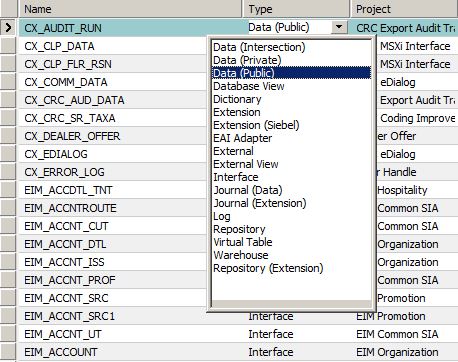
Below are some screenshots after which you can possibly get this error:

Error: "S1000 (1652): [tp][ODBC Oracle driver][Oracle]ORA-01652: unable to extend temp segment by 128 in tablespace USERS"
RESOLUTION:
The solution to avoid this error is very simple. Just mention the default Siebel tablespace in the "Index space" property as shown below. In this case it is "SIEBINDX". And click on Apply.
Keep Reading
Mohammed Arif
Tuesday, August 30, 2016
NO_MERGE_ROW error in EIM Merge process
NO_MERGE_ROW error means the surviving record cannot be found in the EIM table with the same batch number as that of that deleted record. When EIM is unable to find the IF_ROW_MERGE_ID (which is the EIM table ROW_ID of the surviving record) value in the EIM table and with the same batch number (IF_ROW_BATCH_NUM), it throws NO_MERGE_ROW error.
But there might be another reason for this error. Consider a situation where the surviving record's user keys are not unique in base tables due to data inconsistencies. In this case when merge runs, it throws AMBIGUOUS error for the surviving records and NO_MERGE_ROW error for all child (deleted) records that corresponds to these parent AMBIGUOUS records though the batch numbers for both are same.
So, to summarize below 2 reasons result in NO_MERGE_ROW error:
Resolution is to either correct the batch numbers of the parent and child record or resolve the error (e.g. AMBIGUOUS) for surviving record depending on the situation explained above.
Note: NO_MERGE_ROW error throws only for child records i.e. for which IF_ROW_MERGE_ID is not null.
Keep Reading...
Mohammed Arif
But there might be another reason for this error. Consider a situation where the surviving record's user keys are not unique in base tables due to data inconsistencies. In this case when merge runs, it throws AMBIGUOUS error for the surviving records and NO_MERGE_ROW error for all child (deleted) records that corresponds to these parent AMBIGUOUS records though the batch numbers for both are same.
So, to summarize below 2 reasons result in NO_MERGE_ROW error:
- Batch numbers for parent (surviving) and child (deleted) EIM records are different.
- Surviving record is errored-out due to data inconsistencies or for any other reason.
Resolution is to either correct the batch numbers of the parent and child record or resolve the error (e.g. AMBIGUOUS) for surviving record depending on the situation explained above.
Note: NO_MERGE_ROW error throws only for child records i.e. for which IF_ROW_MERGE_ID is not null.
Keep Reading...
Mohammed Arif
Wednesday, July 6, 2016
SSACommonDllInit failed for enu(SBL-GEN-02505)
Error in launching Siebel Tools/Siebel Web client after installing IP 2015/2016:
Error: SSACommonDllInit failed for enu(SBL-GEN-02505)
During one of my project, i faced this error while launching siebel tools after installing the IP 2016 pack on existing Siebel 8.1.1.11 version on top of IP 2013.
The mistake was that i had initiated the setup of new IP 2016 tools using module.exe file. This was very common as we had installed earlier version using module.exe only.
Oracle says the installation has to be initiated by executing setup.bat present at the same location as module.exe.
Using setup.exe helped resolve the above issue!
Link: Siebel Tools Not Launching - Siebel Innovation Pack 15.0.0.0.0 (Doc ID 2141576.1)
Keep Reading
Mohammed Arif
Error: SSACommonDllInit failed for enu(SBL-GEN-02505)
During one of my project, i faced this error while launching siebel tools after installing the IP 2016 pack on existing Siebel 8.1.1.11 version on top of IP 2013.
The mistake was that i had initiated the setup of new IP 2016 tools using module.exe file. This was very common as we had installed earlier version using module.exe only.
Oracle says the installation has to be initiated by executing setup.bat present at the same location as module.exe.
Using setup.exe helped resolve the above issue!
Link: Siebel Tools Not Launching - Siebel Innovation Pack 15.0.0.0.0 (Doc ID 2141576.1)
Keep Reading
Mohammed Arif
Tuesday, May 31, 2016
Siebel Innovation Pack 2016 – What’s New?
General:
- Siebel Business Applications use Siebel Open UI. As of Siebel Innovation Pack 2016, the high interactivity and standard interactivity clients are no longer supported. After you migrate to the current release, applications previously deployed using high interactivity now automatically use Siebel Open UI. It is no longer necessary or possible to explicitly enable Siebel Open UI. Server parameters that previously applied only to high interactivity or standard interactivity no longer apply. New customer applications for Siebel Open UI take the place of some of the de-supported standard interactivity applications.
- As of Siebel Innovation Pack 2016, Siebel Business Applications use Siebel Open UI exclusively.
- Siebel Handheld and Siebel Wireless applications are no longer supported.
- The local database for Siebel Mobile Web Client uses Oracle Database XE.
- Platform: The parameter UseANSIControlsForCP is obsolete
- Database collation for the Siebel Mobile Web Client, for which the local database uses Oracle Database XE, is the same as for Oracle Database.
- Java is no longer used in the browser to support functions in Siebel Business Applications.
- Oracle does not support new Siebel CRM deployments that do not use UTC.
Installation/Administration:
- Certain directories have been moved, consolidated, or eliminated in Siebel Server, Siebel Web Server Extension (SWSE), and Siebel Mobile Web Client installations. For example, the webmaster directory is no longer part of the Siebel Server installation. The files and subdirectories previously installed in this location are installed only in the public directory in the SWSE installation.
- Siebel Business Applications no longer include Siebel Handheld applications.
- For migration installations of Siebel Innovation Pack 2016, some manual migration tasks are required on the Siebel Server, the Siebel Web Server Extension (SWSE), Siebel Web Client, and Siebel Tools, due to product changes such as directory restructuring. The virtual directories now map to public on the SWSE instead of language directories like public\ENU. The Siebel Enterprise Security Token is no longer applicable. You must reconfigure the SWSE after installing. Additional requirements apply.
- Added anonymous user settings for the Siebel REST Server, which is the instance of Apache Tomcat that was installed with the Siebel Server. The Tomcat Proxy Object Manager component in the EAI component group is also new in this release. See also Siebel REST API Guide.
- The license keys previously provided in seed data are inactive. A new utility is provided for activating or deactivating license keys.
- Support for CalDAV and CardDAV is enhanced. Customers must configure the Web server to enable this functionality.
- For Siebel Innovation Pack 2016, updated Siebel Repository Files (SRF files) are provided with the release.
- In Siebel Innovation Pack 2016, Oracle Database XE is used for the local database or sample database for Siebel Web Client or for the local database for Siebel Tools. SAP SQL Anywhere is no longer available.
- Siebel Tools supports a new feature called workspaces, which provides a new way to manage the configuration of repository artifacts in Siebel Tools. This feature allows multiple developers to work against the same repository objects in the Siebel database.
- Customers can install Desktop Integration Siebel Agent on user computers. This new software module enables users to use certain application features that formerly were based on Java applets.
- Customers can install Outlook to Siebel Drag and Drop on user computers. This new add-in for Microsoft Outlook enables users to drag and drop emails and attachments into Siebel Business Applications.
- Siebel QuickStart is no longer supported for the Siebel Mobile Web Client. The AutoStopDB configuration parameter also no longer applies.
- jQuery Charts is enabled for charting functionality. Siebel Charts Server (Visual Mining NetCharts) is no longer provided.
- As of Siebel Innovation Pack 2016, the value of the Siebel File System parameter cannot exceed 2048 characters.
- Changed software version references to Siebel CRM version 16.0, which is also known as Siebel Innovation Pack 2016
CTI Related:
- A separately installed client module, Desktop Integration Siebel Agent (DISA), is used to obtain the local computer's host name for hoteling purposes. It is recommended to install Desktop Integration Siebel Agent on each agent computer that will be used for hoteling.
- The display and configuration of icons in the communications toolbar are now more consistent with Siebel Open UI. Toolbar icons are now specified in cascading style sheet (CSS) files. Image files and icon files for interactive drivers no longer apply. The MultiActiveCmdIcon communications command is now obsolete.
- Docking options for the communications panel have changed.
- Updated description of Bring Siebel to Front user preference, which is now integrated with the Web notifications feature that is supported by many browsers
- Due to the evolution of browsers away from supporting Netscape Plugin Application Programming Interface (NPAPI), as of Siebel Innovation Pack 2016, Java is no longer used to support hoteling, the communications toolbar, or other functions in Siebel Business Applications.
- The Virtual CTI Driver (for Oracle Contact On Demand) is no longer supported.
Security Related:
- You must enable TLS for Web applications, such as Oracle BI Publisher, running on Oracle WebLogic server.
System Administration Related:
- Added the Tomcat Proxy Object Manager, a new component in the EAI component group
- Siebel server component changes:
- Removed the component group MWC Real Time Sync (RTSRemote) and all of its components
- Removed the component SMQ Receiver (SMQReceiver) from the EAI component group
- Removed the component Siebel Mobile Connector Object Manager (SMCObjMgr) from the Sales component group
- Removed the component group Siebel Wireless (Wireless) and all of its components
- Removed the Object Manager components for Siebel Handheld from the component groups HandheldSync and HandheldSyncSIS
- Removed the component eService Object Manager (eServiceObjMgr) from the CallCenter component group
- Enterprise server component changes:
- Added the parameter EnableComposer. This parameter replaces the obsolete parameter EnableResponsive
- Removed the obsolete parameters EnableCDA, EnableEmailClientAutomation, EnableOpenUI, EnableResponsive, EnableSIBusyCursor, EnableSIDataLossWarning, EnableWebClientAutomation, HighInteractivity, JREDownloadUrl, ListRowStyle, MarkupLanguage, and SiebEntSecToken
- Added new parameters SessionTimeoutWLCommand and SessionTimeoutWLMethod to the [defaults] section of eapps.cfg file
- Configuration parameter changes:
- Removed the parameter DefaultChartFont from the [Siebel] section
- Removed the parameter EnableResponsive from the [InfraUIFramework] section
- Removed the parameter ExtendedKeyboard from the [InfraUIFramework] section
- Removed the parameters LotusForm and OutlookForm from the [Email] section
- Removed the parameter ViewPreloadSize from the [InfraUIFramework] section and all of the parameters in the [Preload] section
- Data source parameter changes:
- Removed the AutoStartDB parameter, which is no longer applicable
- Updated the description of the ConnectString parameter
- Updated the description of the FileSystem parameter
- Removed the SortCollation parameter
- Updated the description of the SqlStyle parameter
Configuration/Open UI/Siebel Tools:
- Chart applet not supported
- Developers MUST now use Oracle Database XE for the local database for Siebel Tools.
- Siebel online help does not support context sensitivity
- New preferences added that affect Open UI appearance and behavior
- Configuring Siebel Charts with a Third-Party JavaScript Chart Library has now become obsolete
- New Workspace feature in Siebel tools
Partner Application (PRM):
- Shopping cart transfer is not supported
- Siebel Agent Portal, Siebel PRM for Finance, Siebel Healthcare Provider Portal, Siebel Group Portal, Siebel PRM for Communications, Media, and Energy, and Siebel PRM for Consumer Goods are now not supported
- Partner alerts, Using Siebel Briefings, Content Services, and Content Broker not supported now
Siebel Search support:
- Siebel Find is available by default
- The integration of third-party search engines must be set up and configured if required
- Oracle Secure Enterprise Search integration must be configured if required
- A basic search operation, an advanced find operation, and an OSES advanced search operation in Siebel Search
- Configuring Siebel Search for third-party search engines
- Configuring the Oracle Secure Enterprise Search engine for the Search Results view
- Clearing attachments from the Shared Search UNC Location
Siebel Remote and Replication Manager:
- Siebel Store and Forward Messaging are no longer supported
- DbinitLocalSource parameter (used for Extracting a Database to a CD-ROM or Other Portable Media) is obsolete now
Keep Reading
Mohammed Arif
Tuesday, May 26, 2015
Difference between Organization, Internal Division, Account and Partner in Siebel
What is the difference between Organization, Internal Division, Account and Partner in Siebel?
Organization:
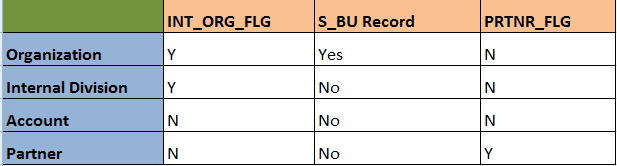
An organization (in Siebel terminology) is a business unit within an company, enterprise or organization. Organizations represents the broadest divisions of the company. An organization controls the data access of the employees that are assigned to it. Organizations can be internal, or they can be external (in the case of Siebel PRM).
In Siebel technical terms, an organization is that which satisfies the below 2 conditions:
1. S_ORG_EXT.INT_ORG_FLG = 'Y'
2. Has an associated S_BU record.
E.g. Default Organization
select int_org_flg from siebel.s_org_ext where name = 'Default Organization';
select * from siebel.s_bu where name = 'Default Organization';
Internal Division:
Divisions are used to create organization structure and to link positions to that organization structure. Divisions belong to organizations and have no direct effect on visibility
In technical terms, an internal division satisfies below 2 conditions:
1. S_ORG_EXT.INT_ORG_FLG = 'Y'
2. Does not have associated S_BU record.
E.g. INTERNAL
select int_org_flg from siebel.s_org_ext where name = 'INTERNAL';
Account:
An account is any external organization with which your company does business. It negotiates agreements, receives service and bills, and raises trouble tickets. An account is usually the central entity of a Siebel CRM implementation. It may also represent a current or potential client, a business partner, or a competitor.
An Account satisfies the below conditions:
1. S_ORG_EXT.INT_ORG_FLG = 'N'
2. Obviously it does not have associated S_BU record.
E.g. ABC Corp
select int_org_flg from siebel.s_org_ext where name = 'ABC Corp';
Partner:
A partner organization is generally a channel or alliance partners, distributors, resellers, agents, brokers, or dealers of the brand owner company.
A Partner satisfies 2 conditions:
1. S_ORG_EXT.INT_ORG_FLG = 'N' and S_ORG_EXT.PRTNR_FLG = 'Y
2. No associated S_BU record.
E.g. Helix Services
select int_org_flg, prtnr_flg from siebel.s_org_ext where name = 'Helix Services';
To summarize:
Mohammed Arif
Monday, May 18, 2015
Error SBL-EIM-00306, in "ifb_name.ifb" line 63: Invalid token for right-hand side.
This error is one of the rare-coming errors for experienced professional but common for beginners as the cause is so tuned that is difficult to identify.
Well, with the error description itself it is clear that something is wrong/incorrect in the configuration file. Lets discuss the problem, cause and solution for this.
Problem:
Error encountered on UI when the EIM is run "SBL-EIM-00204: Invalid configuration file (ifb) name". This is a very generic error which may not give you a hint about the actual error. So when you dig the log you may find "Error SBL-EIM-00306, in "ifb_name.ifb" line 63: Invalid token for right-hand side."
Cause:
The actual cause of this error might be more than one or may be altogether different at different times. The one that i found out (in my case) was a space after the DEFAULT COLUMN parameter. Below was the cause:
DEFAULT COLUMN = ADMIN_ADJ_FLG, "N" <-- space after statement ends
Solution:
So the simple solution here is to double check for any space after any statement in the ifb, particularly the Default column parameter. The space after this parameter is treated as a token which is not recognized by the EIM engine which reads the configuration file before starting the actual load. The right hand side means that the cause is after "=" sign which is treated as right hand side whereas Default Column is treated as left hand side.
Keep reading...
Mohammed Arif
This error is one of the rare-coming errors for experienced professional but common for beginners as the cause is so tuned that is difficult to identify.
Well, with the error description itself it is clear that something is wrong/incorrect in the configuration file. Lets discuss the problem, cause and solution for this.
Problem:
Error encountered on UI when the EIM is run "SBL-EIM-00204: Invalid configuration file (ifb) name". This is a very generic error which may not give you a hint about the actual error. So when you dig the log you may find "Error SBL-EIM-00306, in "ifb_name.ifb" line 63: Invalid token for right-hand side."
Cause:
The actual cause of this error might be more than one or may be altogether different at different times. The one that i found out (in my case) was a space after the DEFAULT COLUMN parameter. Below was the cause:
DEFAULT COLUMN = ADMIN_ADJ_FLG, "N" <-- space after statement ends
Solution:
So the simple solution here is to double check for any space after any statement in the ifb, particularly the Default column parameter. The space after this parameter is treated as a token which is not recognized by the EIM engine which reads the configuration file before starting the actual load. The right hand side means that the cause is after "=" sign which is treated as right hand side whereas Default Column is treated as left hand side.
Keep reading...
Mohammed Arif
Tuesday, December 16, 2014
SBL-EIM-00206: Failed to run initial process.
Problem:
EIM job failing and the error thrown on UI is "SBL-EIM-00206: Failed to run initial process.". What could be the reason?
Solution:
This is one of the most common error that you can see on the "Completion Information" column on Admin- Server mgmt job list applet. Also this error is faced mostly by beginners in siebel EIM.
First thing, don't panic at all..its a common, known and small issue. Go back and look at your configuration file. If you dont find anything wrong, look again into it.
Most probably it results due to typo in the ifb file. For e.g. the IFB has
INSERT ROW = S_CONTACT, TRUE instead of INSERT ROWS = S_CONTACT, TRUE
[Siebel Intrface Manager] instead of [Siebel Interface Manager]
LOG TRANSACTIONS = FALSE instead of LOG TRANSACTION = FALSE
[Siebel Intrface Manager] instead of [Siebel Interface Manager]
LOG TRANSACTIONS = FALSE instead of LOG TRANSACTION = FALSE
...and what not!! Look alphabet by alphabet. Sometimes you may miss a parameter which is mandatory like TABLE, BATCH, TYPE etc.
If everyting is ok in IFB, dig the log, you will surely find the root cause here :-)
Delete contacts from siebel through EIM
How to delete contacts from siebel through EIM?
Deleting from siebel can be done by 3 different ways depending on the requirement:
1. Deleting from a target/non-target base table using the user keys: DELETE EXACT method
2. Deleting from a target base table using a filter condition: DELETE MATCHES method
3. Deleting all rows from target base table: DELETE ALL ROWS method
2. Deleting from a target base table using a filter condition: DELETE MATCHES method
3. Deleting all rows from target base table: DELETE ALL ROWS method
Identify the deletion method:
Here we will take example of deleting contacts by using DELETE EXACT method. The requirement is to delete duplicate contacts in siebel. Once the logic for identifying duplicate contacts is implemented (this may depend on specific business scenario), we can go ahead and delete the party records associated with the contacts.
Get all information needed to load in EIM table:
Remember: To delete a contact, you need to delete contact records and associations from atleast 4 tables: S_PARTY, S_CONTACT, S_CONTACT_BU AND S_POSTN_CON. This is same as when importing a contact. There may be other assoicated records that you may want to delete like activities, service requests, opportunities etc. For accomplishsing these you need to identify all the child tables and records where reference to these contacts are present, build the logic and delete the data.
The only thing need to be identified after implemeting duplicate logic is the PARTY_UID of S_PARTY table. This can be obtained by below query:
--Execute:
SELECT
CON.ROW_ID,
PAR.PARTY_UID,
PAR.PARTY_TYPE_CD
FROM
SIEBEL.S_CONTACT CON,
SIEBEL.S_PARTY PAR
WHERE
PAR.ROW_ID = CON.PAR_ROW_ID
AND CON.ROW_ID IN(/*DUPLICATE LOGIC SUBQUERY RETURNING CONTACT ROW_ID*/);
CON.ROW_ID,
PAR.PARTY_UID,
PAR.PARTY_TYPE_CD
FROM
SIEBEL.S_CONTACT CON,
SIEBEL.S_PARTY PAR
WHERE
PAR.ROW_ID = CON.PAR_ROW_ID
AND CON.ROW_ID IN(/*DUPLICATE LOGIC SUBQUERY RETURNING CONTACT ROW_ID*/);
Load EIM table:
The interesting thing is that for deleting a contact, only party details need to be entered in EIM_CONTACT. The party information (PARTY_UID, PARTY_TYPE_CD) are the only requirement to delete a contact from all the 4 base tables mentioned above.
--Script:
INSERT INTO SIEBEL.EIM_CONTACT
(
ROW_ID,
IF_ROW_STAT,
IF_ROW_BATCH_NUM,
PARTY_UID,
PARTY_TYPE_CD
)
SELECT
ROWNUM,
'FOR_IMPORT',
1,
PAR.PARTY_UID,
PAR.PARTY_TYPE_CD
FROM
SIEBEL.S_CONTACT CON,
SIEBEL.S_PARTY PAR
WHERE
PAR.ROW_ID = CON.PAR_ROW_ID
AND CON.ROW_ID IN(/*DUPLICATE LOGIC SUBQUERY RETURNING CONTACT ROW_ID*/);
INSERT INTO SIEBEL.EIM_CONTACT
(
ROW_ID,
IF_ROW_STAT,
IF_ROW_BATCH_NUM,
PARTY_UID,
PARTY_TYPE_CD
)
SELECT
ROWNUM,
'FOR_IMPORT',
1,
PAR.PARTY_UID,
PAR.PARTY_TYPE_CD
FROM
SIEBEL.S_CONTACT CON,
SIEBEL.S_PARTY PAR
WHERE
PAR.ROW_ID = CON.PAR_ROW_ID
AND CON.ROW_ID IN(/*DUPLICATE LOGIC SUBQUERY RETURNING CONTACT ROW_ID*/);
Create IFB and Run EIM job:
[Siebel Interface Manager]
PROCESS = "DELETE_CONTACTS"
[DELETE_CONTACTS]
TYPE = SHELL
INCLUDE = DELETE_CONTACTS_RECORDS
TYPE = SHELL
INCLUDE = DELETE_CONTACTS_RECORDS
[DELETE_CONTACTS_RECORDS]
TYPE = DELETE
BATCH = 1
TABLE = EIM_CONTACT
ONLY BASE TABLES = S_PARTY
DELETE EXACT = TRUE
TYPE = DELETE
BATCH = 1
TABLE = EIM_CONTACT
ONLY BASE TABLES = S_PARTY
DELETE EXACT = TRUE
COMMIT EACH PASS = FALSE
COMMIT EACH TABLE = FALSE
ROLLBACK ON ERROR = TRUE
COMMIT EACH TABLE = FALSE
ROLLBACK ON ERROR = TRUE
Verify the status of the records:
select count(1), if_row_stat, if_row_batch_num
from siebel.eim_contact
where if_row_batch_num = 1
group by if_row_stat, if_row_batch_num;
from siebel.eim_contact
where if_row_batch_num = 1
group by if_row_stat, if_row_batch_num;
Thursday, December 11, 2014
Oracle PL/SQL performance problems: SQL Tuning
The first basic step towards PL/SQL block/procedure/package tuning:
In most of the EIM processing, the data in EIM tables are pushed through PL/SQL packages or standalone procedures etc. At times the pl/sql code becomes bottleneck during the cut-over window/deployment espicially when the amount of data is huge. Proper tuning of the pl/sql code in advance can reduce the execution time and increase the throughput.
Here I would like focus on just one little but very important and critical parameter for performance. Normally when the throughput is poor and the performance is at stake, we try to put the blame on database factors [and yes the DBA too :-)], available physical resources and many others. But the question is to realize what utilizes the database resources and how efficiently it utilizes.
The basic element of every pl/sql code is the embedded SQL statements. The first thing that should come to our mind when concerned with performance tuning is the SQL statements inside the pl/sql code. Slow SQL statements are the main reason for slow execution. Tuning these sql statement can greatly enhance the performance of the overall code.
You can find a lot amount of content on tuning SQL statement and that too in great details on the internet, here i will just summarize those tips for reference and relate it with Siebel EIM if applicable:
1. Make sure you have appropriate indexes on the staging and other external ables that are used to push data to EIM tables. This may depend on your requirements.
2. Make sure you have up-to-date statistics on all the tables, using the subprograms in the DBMS_STATS package. For EIM processing this is very very beneficial. (for both EIM and Base tables) E.g.
Here I would like focus on just one little but very important and critical parameter for performance. Normally when the throughput is poor and the performance is at stake, we try to put the blame on database factors [and yes the DBA too :-)], available physical resources and many others. But the question is to realize what utilizes the database resources and how efficiently it utilizes.
The basic element of every pl/sql code is the embedded SQL statements. The first thing that should come to our mind when concerned with performance tuning is the SQL statements inside the pl/sql code. Slow SQL statements are the main reason for slow execution. Tuning these sql statement can greatly enhance the performance of the overall code.
You can find a lot amount of content on tuning SQL statement and that too in great details on the internet, here i will just summarize those tips for reference and relate it with Siebel EIM if applicable:
1. Make sure you have appropriate indexes on the staging and other external ables that are used to push data to EIM tables. This may depend on your requirements.
2. Make sure you have up-to-date statistics on all the tables, using the subprograms in the DBMS_STATS package. For EIM processing this is very very beneficial. (for both EIM and Base tables) E.g.
-- Execute:
EXEC DBMS_STATS.GATHER_TABLE_STATS('SIEBEL','EIM_CONTACT',DEGREE =>10,ESTIMATE_PERCENT =>100,METHOD_OPT =>'FOR ALL INDEXED COLUMNS SIZE AUTO',GRANULARITY =>'ALL',CASCADE=>TRUE);
3. Analyze the execution plans and performance of the SQL statements, using: EXPLAIN PLAN statement. E.g.
-- Execute:
explain plan for
select * from STG_PRODUCT where batch = '125642890235; -- your SQL statement
-- Output the explain plan
select PLAN_TABLE_OUTPUT
from table(dbms_xplan.display('plan_table',null,'basic'));
4. Rewrite the SQL statements if necessary. For example, query hints can avoid problems such as unnecessary full-table scans. Avoid unnecessary full table scans for tables, this is very costly in terms of execution time.
5. Combine multiple SQL statements into one if possible. Each time you run a SQL statement in PL/SQL (and vice versa) there is a context switch and SQL statements have to be sent to the SQL statement executor (SQL engine) in the database. Obviously, therefore, if you have fewer SQL statements embedded in your PL/SQL code you will reduce the load on the Oracle database processing those statements.
6. a) If you are running SQL statements inside a PL/SQL loop, look at the FORALL statement as a way to replace loops of INSERT, UPDATE, and DELETE statements.
b) If you are looping through the result set of a query, look at the BULK COLLECT clause of the SELECT INTO statement as a way to bring the entire result set into memory in a single operation.
explain plan for
select * from STG_PRODUCT where batch = '125642890235; -- your SQL statement
-- Output the explain plan
select PLAN_TABLE_OUTPUT
from table(dbms_xplan.display('plan_table',null,'basic'));
4. Rewrite the SQL statements if necessary. For example, query hints can avoid problems such as unnecessary full-table scans. Avoid unnecessary full table scans for tables, this is very costly in terms of execution time.
5. Combine multiple SQL statements into one if possible. Each time you run a SQL statement in PL/SQL (and vice versa) there is a context switch and SQL statements have to be sent to the SQL statement executor (SQL engine) in the database. Obviously, therefore, if you have fewer SQL statements embedded in your PL/SQL code you will reduce the load on the Oracle database processing those statements.
6. a) If you are running SQL statements inside a PL/SQL loop, look at the FORALL statement as a way to replace loops of INSERT, UPDATE, and DELETE statements.
b) If you are looping through the result set of a query, look at the BULK COLLECT clause of the SELECT INTO statement as a way to bring the entire result set into memory in a single operation.
Both these are PL/SQL features but helps in tuning the sql statements.
7. Inefficient usage of loops inside the code can also prove very costly. Loops can be replaced with FORALL statements.
8. Use the BULK COLLECT clause on the query to bring the query results into memory in one operation
9. Use subselect (nesting one query inside another) for filtering query results.
10. Use highly optimized string functions such as REPLACE, TRANSLATE, SUBSTR, INSTR, RPAD, and LTRIM, these are very efficient as these use low-level code.
11. use regular expressions like REGEXP_LIKE, REGEXP_INSTR, REGEXP_REPLACE, and REGEXP_SUBSTR for searching and manipulating strings.
12. Implement short-circuit evaluation (as it is called) i.e. put the least expensive conditions first in the WHERE clause that evaluates multiple conditions separated by AND or OR.
13. Choose data types carefully to minimize implicit conversions as too many implicit conversions becomes overhead during execution. Like use of PLS_INTEGER instead of INTEGER etc.
14. Finally, do not ignore the warnings thrown by the compiler, applying the advice of the compiler might increase the efficiency of the overall code.
Much more and much detail can be added to it, but I have kept it simple and precise. You can pick each one of these and explore and research more on oracle documentation.
7. Inefficient usage of loops inside the code can also prove very costly. Loops can be replaced with FORALL statements.
8. Use the BULK COLLECT clause on the query to bring the query results into memory in one operation
9. Use subselect (nesting one query inside another) for filtering query results.
10. Use highly optimized string functions such as REPLACE, TRANSLATE, SUBSTR, INSTR, RPAD, and LTRIM, these are very efficient as these use low-level code.
11. use regular expressions like REGEXP_LIKE, REGEXP_INSTR, REGEXP_REPLACE, and REGEXP_SUBSTR for searching and manipulating strings.
12. Implement short-circuit evaluation (as it is called) i.e. put the least expensive conditions first in the WHERE clause that evaluates multiple conditions separated by AND or OR.
13. Choose data types carefully to minimize implicit conversions as too many implicit conversions becomes overhead during execution. Like use of PLS_INTEGER instead of INTEGER etc.
14. Finally, do not ignore the warnings thrown by the compiler, applying the advice of the compiler might increase the efficiency of the overall code.
Much more and much detail can be added to it, but I have kept it simple and precise. You can pick each one of these and explore and research more on oracle documentation.
Have a great tuning :-)
Contacts imported through EIM but not visible on UI
I would like share one of the most common issue while importing contacts in siebel. Let me put it in a problem and solution format:
Problem:
Problem:
Contacts are imported in siebel with IF_ROW_STAT as IMPORTED value in EIM_CONTACT but they are not visible on UI. I checked the contacts with siebel administrator position and i am able to see those contact in My teams Contacts and All Contacts views, but the same are not visible to employees who have the visibility of these contacts in My Contacts view
Solution:
1. Check these tables for contacts and its references:
S_PARTY
S_CONTACT
S_CONTACT_BU
S_POSTN_CON
If the contact is imported correctly in S_CONTACT table, pick any row_id say, '1-3KHD-11' and execute the below queries:
select * from siebel.s_party where party_id = '1-3KHD-11';
select * from siebel.s_contact_bu where contact_id = '1-3KHD-11';
select * from siebel.s_postn_con where con_id = '1-3KHD-11';
All the above queries should return at least one record. If not, import data into that table and it will be visible.
2. Check all the search specification on applet as well as Business component level, verify that the search spec condition matches for the records imported.
3. Check the contacts from UI with the position that has the visibility of the contact.
Explanation:
Most of the time, when the contacts are not visible on UI, the common perception is that position would not have been associated correctly. Well, this may be correct for most of the times, but at times we commit some silly mistakes by missing S_CONTACT_BU table in the IFB file parameter ONLY BASE TABLES.
All contacts should have a BU association in S_CONTACT_BU table to be visible on UI. S_CONTACT_BU is the intersection table for S_CONTACT and S_BU. Once this association is properly made, the contacts would be visible to the employee who has the visibility.
Visibility of the contacts also depends on the contacts and position intersection table S_POSTN_CON. For instance, if for a contact row Id, there are 3 records in S_POSTN_CON, this means 3 positions are allowed to see this contact in their My Contacts view. This does not mean that none other than these 3 can see the contacts. The visibility of the contacts apart from assigned positions is also based on the position hierarchy in the organization.
So the first thing we can do is to check all the four tables for correct import. If any discrepancies found, it can be troubleshooted based on the logs.
Next thing is to check the search specification on applet and BC level. For example, if the applet level search spec has [Type] = "Customer" then the imported rows must satisfy this condition to be visible on the contact applet. Similarly if on BC there are any search spec, it should also be satisfied by the imported records.
These information are very basic and fundamental in nature which may help beginners to understand the debugging methods while importing.
Solution:
1. Check these tables for contacts and its references:
S_PARTY
S_CONTACT
S_CONTACT_BU
S_POSTN_CON
If the contact is imported correctly in S_CONTACT table, pick any row_id say, '1-3KHD-11' and execute the below queries:
select * from siebel.s_party where party_id = '1-3KHD-11';
select * from siebel.s_contact_bu where contact_id = '1-3KHD-11';
select * from siebel.s_postn_con where con_id = '1-3KHD-11';
All the above queries should return at least one record. If not, import data into that table and it will be visible.
2. Check all the search specification on applet as well as Business component level, verify that the search spec condition matches for the records imported.
3. Check the contacts from UI with the position that has the visibility of the contact.
Explanation:
Most of the time, when the contacts are not visible on UI, the common perception is that position would not have been associated correctly. Well, this may be correct for most of the times, but at times we commit some silly mistakes by missing S_CONTACT_BU table in the IFB file parameter ONLY BASE TABLES.
All contacts should have a BU association in S_CONTACT_BU table to be visible on UI. S_CONTACT_BU is the intersection table for S_CONTACT and S_BU. Once this association is properly made, the contacts would be visible to the employee who has the visibility.
Visibility of the contacts also depends on the contacts and position intersection table S_POSTN_CON. For instance, if for a contact row Id, there are 3 records in S_POSTN_CON, this means 3 positions are allowed to see this contact in their My Contacts view. This does not mean that none other than these 3 can see the contacts. The visibility of the contacts apart from assigned positions is also based on the position hierarchy in the organization.
So the first thing we can do is to check all the four tables for correct import. If any discrepancies found, it can be troubleshooted based on the logs.
Next thing is to check the search specification on applet and BC level. For example, if the applet level search spec has [Type] = "Customer" then the imported rows must satisfy this condition to be visible on the contact applet. Similarly if on BC there are any search spec, it should also be satisfied by the imported records.
These information are very basic and fundamental in nature which may help beginners to understand the debugging methods while importing.
Tuesday, November 11, 2014
Can we create siebel ROW_ID through EIM?
The plain answer is NO! We cannot create siebel Row Id using Enterprise Integration Manager (EIM). The main reason being siebel Row Ids are created using an algorithm internal to siebel. This algorithm is not exposed anywhere to the developers. What at least we can do is understand the construction of Row Ids and some aspects of it pertaining to uniqueness in the siebel database.
So lets have a basic understanding of Siebel Row Id.
What is ROW ID?
Row Id is a unique identifier associated with every record in Siebel databases. The column in which this value is found is ROW_ID and it is present on every table. For example S_CONTACT.ROW_ID will give the value something like "1-KR3YF" and this value uniquely identifies the contact record in the database. Siebel Row Id is not to be confused with the Oracle ROWID pseudocolumn which returns the address of the record in the database.
Is Siebel Row Id unique across tables?
Most of the beginners would say "Yes" to this question, but the fact is Siebel Row Id are not unique across tables but it is unique for each entity. For example, the ROW_IDs for the same person in S_PARTY, S_CONTACT and S_CONTACT_X are the same because they each refer to the same person.
Row Ids are used extensively throughout Siebel Enterprises to access specific records. Although users access records by a User Primary Key (such as Opportunity Name), it is more efficient for the Siebel Enterprise to store and access related data via the Row Id. The Row Id is a base-36 sequence number generated using a confidential, proprietary algorithm that ensures no duplication, thus protecting the referential integrity of the database. The ROW_ID column is VARCHAR(15) data-type, which may contain one or two non-numeric symbols (plus signs or hyphens, or both).
The format of the ROW_ID is one of the following:
Format
|
Description
|
CP-NS
|
Records created by the user interface
|
CP+NP+NS
|
Records created by Interface Manager (EIM)
|
CP-NP-NS
|
Records created by EIM (Starting in Siebel versions 6.2 and higher,
and Siebel version 7)
|
Where,
CP = Corporate Prefix, up to 2 alphanumeric characters
NP = Next Prefix, up to 6 alphanumeric characters
NS = Next Suffix, up to 7 alphanumeric characters
The maximum length of the ROW_ID is 15 alphanumeric characters. The corporate prefix will always be unique for any database (main or local). The server maintains its original value, and mobile databases created against that particular server database are always assigned a new, unique value.
The Siebel ROW_ID is a combination of the S_SEQUENCE_S and information from S_SSA_ID table. All connected users share the same prefix, which is obtained from the table S_SSA_ID on the server database. Remote Users are assigned a unique prefix when they are db-extracted. This value is also stored in the S_SSA_ID table on the local database.
Suffix is generated using an internal algorithm handled by the source code. When a new record is created through the user interface, the Siebel application reads the value of the current NS column from S_SSA_ID table and increments this value by a value more than 1 – for performance reasons, generally 50. The client caches these fifty potential ROW_IDs for future inserts. A new record entered from the user interface may result in many inserts to the underlying tables, depending on the business components used. When the client disconnects, cached ROW_IDs are lost.
The combination of the prefix and suffix generates a unique row_id. Since Siebel does not expose the algorithm behind generation of row ids, the ROW_ID generation is internal to the EIM process. Therefore Siebel provides user keys to map to a unique record in the base table.
During EIM, the EIM table columns, which map to the user keys of the base table, are populated with values so as to map to a unique record. If that record is to be updated by EIM later, the same user key values have to be populated in the corresponding EIM table columns. Otherwise, it will not resolve into the correct base table record.
For example, PERSON_ID and BU_ID constitute the user keys for S_CONTACT. The corresponding EIM_CONTACT columns are CON_PERSON_UID and CON_BU. When a new record is imported in S_CONTACT using EIM_CONTACT, the CON_PERSON_UID and CON_BU should uniquely identify a Contact record. Now, for updating some fields for this Contact using EIM_CONTACT, CON_PERSON_UID and CON_BU have to be populated with the same set of values that were used during the initial load in order to map to the same Contact record in the base table.
Similarly while loading a child table, which references the row id of the master table, the EIM table columns that map to the foreign-key column of the child table must be populated in the same way the
user keys of the master table were populated.
For example, S_CONTACT_XM is a child table of S_CONTACT. The column PAR_ROW_ID of S_CONTACT_XM references the ROW_ID of S_CONTACT. S_CONTACT_XM is loaded by EIM_CON_DTL. The columns of EIM_CON_DTL that need to be populated to generate the PAR_ROW_ID of S_CONTACT_XM are CON_BU, CON_PERSON_UID and CON_PRIV_FLG. These EIM columns should be populated with the same set of values that were used to populate its parent S_CONTACT record through EIM_CONTACT. Note that though PRIV_FLG is not a part of the user key of S_CONTACT, but it is a required column and is part of the foreign-key mapping of its child table.
Conclusion:
So, though siebel has made hidden from us the algorithm of generating Row Ids, it has given a beautiful way of identifying uniqueness of siebel records which is the "User Keys". The concept of User Keys is the heart of Siebel EIM. If one doesn't understands user keys he cannot understand EIM. And why I called it a beautiful way is because it shows Siebel's customer centric approach and implementing the abstraction concept by providing and promoting access to easier method (User keys) while hiding the difficult one (Mechanism of Row Id).
Keep reading :-)
Mohammed Arif
Thursday, August 14, 2014
EIM Delete process explained!
EIM delete is not as complex as merge process but a proper understanding of its functioning is very important as one may happen to accidentally delete critical customer data in the process. Below are few things that one must understand for delete process to work as per expectation:
How does EIM delete process work?
- EIM reads information from the EIM tables and the EIM configuration file to identify rows to delete from the Siebel base tables.
- During its multiple passes through the EIM tables, EIM performs the following tasks:
- EIM initializes the EIM tables for deletion.
- It applies filter logic to do one of the following:
- Select rows for deleting
- Insert EIM tables rows that correspond to matching base table rows
- Select rows with matching user keys in the EIM tables
- EIM updates other tables with rows containing foreign keys that point to newly deleted rows.
What delete methods are supported?
- EIM uses a combination of EIM table row contents and configuration file parameter values to determine the method for selecting rows to be deleted. The following methods are supported:
- Delete rows in a Siebel base table with user key values specified in the corresponding EIM table. (DELETE EXACT)
- Delete rows in the base table where the contents of a named column match those specified by a WHERE clause expression in the configuration file. (DELETE MATCHES)
- Delete all rows in the base table (DELETE ALL ROWS)
How does the delete process flow?
- Preparing for an EIM delete process requires a thorough understanding of the parameter settings that specify delete criteria.
- To delete data, EIM performs the following steps:
- EIM initializes EIM tables for delete.
- If CLEAR INTERFACE TABLE in the configuration file is TRUE, all rows with the specified batch number are deleted. CLEAR INTERFACE TABLE must be FALSE for a delete process that uses EIM table values to identify rows for deletion.
- EIM deletes rows.
- If the DELETE EXACT parameter in the configuration file is set to TRUE, EIM deletes the rows from the table that match the user key defined in the EIM table.
- If the DELETE MATCHES parameter in the configuration file is set to a base table, EIM deletes the rows from the target base table that match the predicate specified in the parameter.
- If the DELETE ALL ROWS parameter in the configuration file is set to TRUE, EIM deletes all rows from the target base table.
- EIM sets IF_ROW_STAT to DELETED for rows that are successfully processed.
- When a foreign key column that references the deleted record is a required one, the record with the foreign key is deleted. Otherwise, the foreign key column is cleared.
- EIM deletion of a parent row causes cascade deletion of child rows only if the foreign key column in the child table is a mandatory column. Otherwise a cascade clear is performed.
DELETE EXACT Parameter:
- Specifies the base table rows to delete by using user key values specified in the EIM table.
- By default, DELETE EXACT = FALSE.
- If DELETE EXACT is set to TRUE, you must use the ONLY BASE TABLES parameter in conjunction with this parameter to identify the base tables.
- Although this parameter can be used to delete rows from both target and non-target base tables use the DELETE EXACT parameter to delete only non-target base tables containing user keys.
- Rows in non-target base tables that do not contain user keys will not be deleted. For example, you cannot use the DELETE EXACT parameter to update the S_ACTION_ARG table and the S_ESCL_ACTION table because there are no user keys defined for these tables.
- As another example, you can use DELETE EXACT to delete any of the non-target base tables such as S_ADDR_PER and S_ACCNT_POSTN using the EIM_ACCOUNT table. In this case, the EIM_ACCOUNT table would need to be loaded with records that would singularly identify the S_ACCNT_POSTN or the S_ADDR_PER record to be deleted.
- To use the DELETE EXACT parameter to delete data from base tables other than the target base table, specify the user key columns only for a single base table for each row in the EIM table.
- When specifying rows for exact deletion, make sure any columns not necessary to specify the row to be deleted are NULL to avoid problems with deleting from the wrong base table.
- EIM tries to enforce this behavior by requiring other user key columns to be NULL. If a row cannot be identified as clearly referring to a row in a single base table, that row will fail to be deleted.
DELETE MATCHES Parameter:
- Specifies a WHERE clause expression for filtering base table rows.
- The value is in two parts: the Siebel base table name and the filter expression that goes against the target base table.
- An example would be: DELETE MATCHES = S_ORG_EXT, (LAST_UPD > ‘2000-06-22’ AND LAST_UPD < ‘2000-06-23’)
- The expression is a self-contained WHERE clause expression (without the WHERE) and should use only literal values or column names (optionally prefixed with the base table name). There must also be a space separating the operator from the operand in this expression (a space must be added between > and ‘). When deleting rows for a specific date, you should use date ranges as shown in the example instead of setting the date equal to a specific date.
- By default, DELETE MATCHES expressions are not used.
- This parameter will only write the user keys values of the deleted target table rows to the EIM table columns. It will not write values of nonuser keys columns or non-target table rows column values to the EIM table.
- The deleted rows cannot be re-imported using the EIM table rows written by the EIM delete process, because they will not contain all the original information.
- Only use this parameter to delete rows from target base tables. Rows will be deleted from the target base table even if the DELETE ROWS parameter is set to FALSE for that table.
DELETE ALL ROWS Parameter:
- Specifies that all rows in the target base table are to be deleted.
- Default is FALSE.
- Existing values in the EIM table and DELETE MATCHES expressions are ignored.
- This parameter will only write the user keys values of the deleted target table rows to the EIM table columns. It will not write values of nonuser keys columns or non-target table rows column values to the EIM table.
- The deleted rows cannot be re-imported using the EIM table rows written by the EIM delete process, because they will not contain all the original information.
Common header and process section parameters for delete process:
PARAMETERS
|
DESCRIPTION
|
CASCADE DELETE ONLY
|
Default is FALSE, Set
this parameter to TRUE to delete child records with null able foreign keys
when the parent record is deleted. If FALSE, then when EIM deletes a parent
record, it sets the foreign keys of the child records to NULL.
|
CLEAR INTERFACE TABLE
|
Specifies whether
existing rows in the EIM table for the given batch number should be deleted, Valid
values are true (the default unless DELETE EXACT = TRUE) and false (the
default if DELETE EXACT = FALSE).
|
DELETE ALL ROWS
|
Used for deleting all
rows in table, Default is FALSE.
|
DELETE EXACT
|
Delete using user key
matching algorithm with rows in EIM table, Default is FALSE.
|
DELETE SKIP PRIMARY
|
Specifies whether EIM
should perform a cascade update to the primary child column, Default is TRUE.
|
DELETE MATCHES
|
SQL WHERE fragment
deletion criteria, Example: DELETE MATCHES = EIM_ACCOUNT, (NAME LIKE
"TST_ACCT%")
|
DELETE ROWS
|
Specifies whether rows
from the target base table can be deleted, Default is TRUE, Prevents
deletions from one table while allowing them in others. For example, the
following parameter setting prevents deletion of rows from the S_ADDR_ORG
table: DELETE ROWS = S_ADDR_ORG, FALSE
|
IGNORE BASE COLUMNS
|
Specifies base table
columns to be ignored by the import process, Use commas to separate column
names, which can be qualified with base table names, Required and user key
columns cannot be ignored, Improves performance when updating all but a few
columns, The default is to not ignore any base table columns.
|
UPDATE ROWS
|
Specifies whether
foreign key references can be updated, This parameter can be used to prevent
the updating of foreign key references with a setting of
FALSE, Default is TRUE,
which affects all tables, To affect only specific tables; you can specify a
table name. For example: UPDATE ROWS = S_CONTACT, TRUE. Also prevents updates
in one table while allowing them in others, If this parameter is set to
FALSE, EIM does not update rows in the specified base table, If you need to
specify multiple tables, use one UPDATE ROWS statement for each table.
|
Image of Delete process parameters:
Subscribe to:
Posts (Atom)